How to add custom contextual links to views?

Submitted by slashrsm on Tue, 09/20/2011 - 18:23

Today I had a task to add nodequeue manipulation contextual links to some view. First I found this blog post, which explains, how to make desired menu items contextual links ready. As Marcus states in his post, I first needed to alter nodequeue menu items:

function MYMODULE_menu_alter(&$items) {
  $items['admin/structure/nodequeue/%nodequeue/edit']['context'] = MENU_CONTEXT_PAGE | MENU_CONTEXT_INLINE;
  $items['admin/structure/nodequeue/%nodequeue/view']['context'] = MENU_CONTEXT_PAGE | MENU_CONTEXT_INLINE;
}

Nodequeue admin pages were now ready to be added to any contextual links on site. Since Marcus explains how to alter contextual links on blocks, I had to figure out how to do it with views. Solution turned out to be very simple. Contextual links are added to view in views-view.tpl.php, where $title_suffix is displayed. I just needed to add nodequeue contextual links to that variable (which is a render array in fact).

function MYTHEME_preprocess_views_view(&$vars) { 
  $vars['title_suffix']['contextual_links']['#contextual_links']['sn_fpmain_news'] = array(
    // 3 is queue id in my case; it could be any other page argument 
    'admin/structure/nodequeue', array(3) 
  ); 
} 

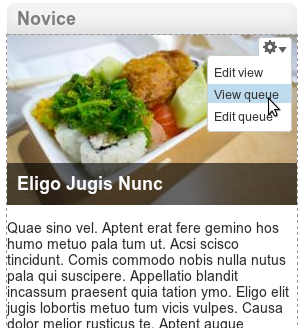
And here is the result:
Is there any better way to do this?

Comments

Submitted by Chad on Wed, 09/21/2011 - 00:23

Enjoyed reading your method, as it certainly works.

I think you could have made this much easier, though.

To do this you can add an additional field to your view which will display the link to the nodequeue - I used 'All queues' and limited it to my queue(or it can be several queues).

Then, I/we themed the link to appear like views admin links (appear on hover).

In my case the name of the template was views-view-field--nodequeue-all-queues.tpl.php and the code can be something like this:
<code>
<?php $data = $row->{$field->field_alias}; ?>
<?php if(user_access('administer nodequeue')): ?>
<!-- this class is needed here so the link will be auto-hidden/displayed -->
<div class="views-admin-links views-hide">
<?php print t('See The Queue: ').$output; ?>
</div>
<?php endif ?>
</code>

Link to Tutorial : http://www.appnovation.com/making-management-nodecues-views-easier

Submitted by slashrsm on Wed, 09/21/2011 - 21:20


Great approach. Thank you for posting that. 
 
In my case it was a request to use Contextual links, since customer already uses it for some other things. Nevertheles, I would use it anyway, as it is more "D7ish" than admin links. Contextual links also take care about permissions, so there is no work with that.

Add new comment